Labs as Code, Part 2: Real Images, Real Topology
Import cEOS into netlab, then build an eight router design worth studying... an OSPF ring with three egress DCs, one route in BGP, and eBGP multihop steering every site's exit.
The FRR triangle from part one proved the workflow. This time we’re building something worth studying on its own… an eight router design pulled from a real network, running on real Arista images. An OSPF ring connects five sites, three of them are datacenters with internet egress, and BGP carries exactly one prefix. The interesting part is how each site chooses its exit, and the answer is eBGP multihop.
Getting cEOS into netlab
FRR pulls from a public registry. Commercial network operating systems make you work a little harder, and Arista’s cEOS is among the friendliest of the bunch… free registration, no license key, real EOS.
Register at arista.com, grab the cEOS-lab image (the cEOS64-lab tarball matching your CPU), and hand it to Docker. The image comes as a container filesystem, so it’s docker import, and the tag needs to match what netlab expects… netlab show images -d eos says the default is ceos:4.34.2F, and you can either tag your import to match or point netlab at whatever version you downloaded.
One heads up on the download. Arista’s site lists the file as a .tar.xz, but it lands on disk as .tar.tar. Put the real extension back, decompress it, and import the plain tarball.
mv cEOS64-lab-4.36.1F.tar.tar cEOS64-lab-4.36.1F.tar.xz
unxz cEOS64-lab-4.36.1F.tar.xz
docker import cEOS64-lab-4.36.1F.tar ceos:4.36.1Fsha256:25de0aabfa690186a81997dd58464052f178bc0305921f9f55f08c4c5251d303The import sits quiet for a few minutes while Docker writes out the whole filesystem, and that hash is all you get back. Check that the image landed.
docker images ceosIMAGE ID DISK USAGE CONTENT SIZE EXTRA
ceos:4.36.1F 25de0aabfa69 3.72GB 934MBMy image is newer than netlab’s default, so I point netlab at it once in ~/.netlab.yml and every lab picks it up. It makes cEOS my default device while it’s at it.
---
device: eos
devices.eos.clab.image: ceos:4.36.1F
Ask netlab again and it agrees on the tag.
netlab show images -d eoseos image names by virtualization provider
┏━━━━━━━━┳━━━━━━━━━━━━━━┳━━━━━━━━━━━━━┓
┃ device ┃ clab ┃ libvirt ┃
┡━━━━━━━━╇━━━━━━━━━━━━━━╇━━━━━━━━━━━━━┩
│ eos │ ceos:4.36.1F │ arista/veos │
└────────┴──────────────┴─────────────┘One import, and every lab you ever build can say device: eos. For contrast, Nokia’s SR Linux skips even that… it pulls from a public registry like FRR does, no registration at all. Every vendor makes a different choice about how hard the free lab image should be to get.
The design
Here’s what we’re building… five sites in an OSPF area 0 ring, three datacenters with internet egress (dc1, dc2, dc3) and two branch sites without (branch1, branch2). Hanging off the ring, a chain of three segment routers (seg1, seg2, seg3) in OSPF area 1, stitched to the backbone through two ABRs. Every site owns one clean /16, which lives on its loopback and goes into OSPF like any other interface.
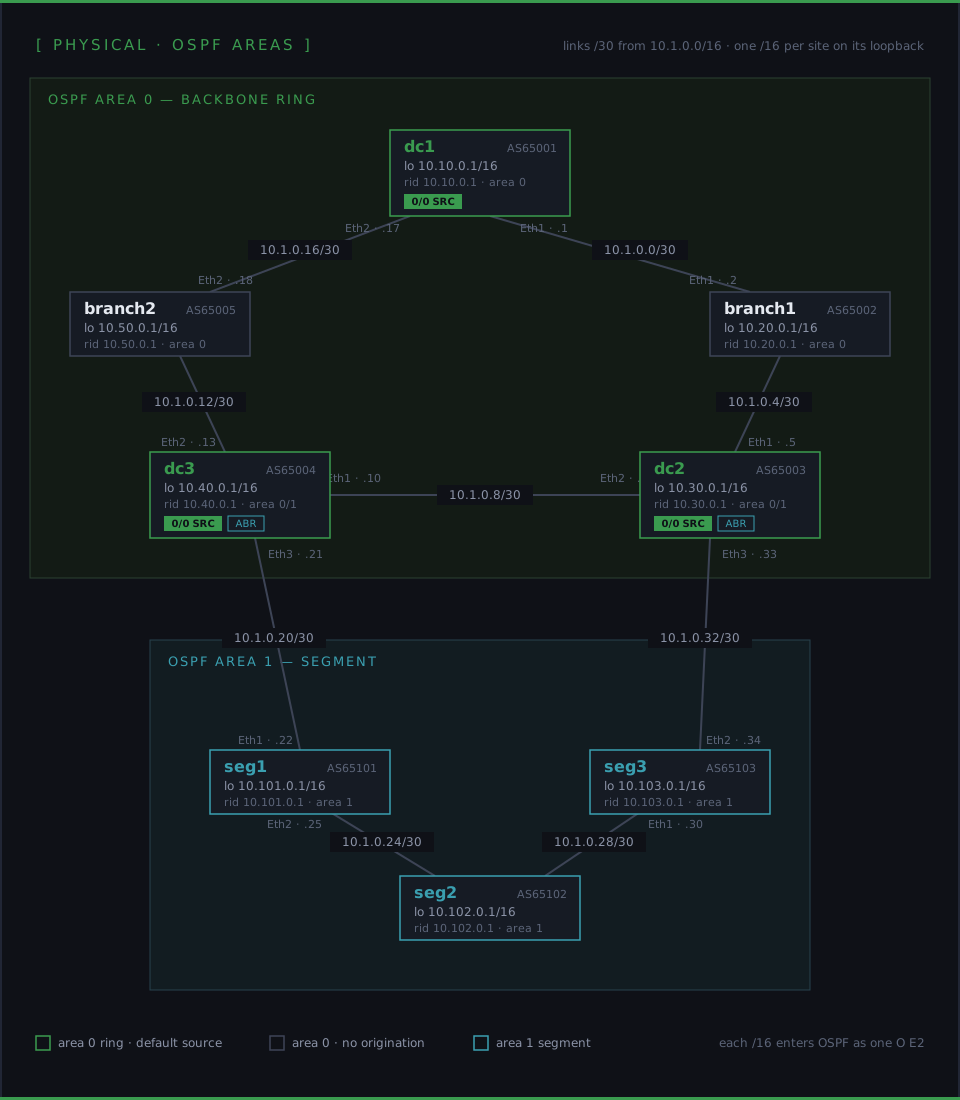
OSPF’s job here is plain reachability… every loopback, every link, an LSA scale nobody will ever notice. The design decision that makes this network interesting is what OSPF leaves alone. BGP carries the default route and decides which datacenter your traffic exits through, and it’s been put on a diet to do exactly that.
One route, three sources, and a knob
BGP in this network carries a single prefix. The three datacenters each originate 0.0.0.0/0, everyone else picks a favorite, and the picking is where it gets good.
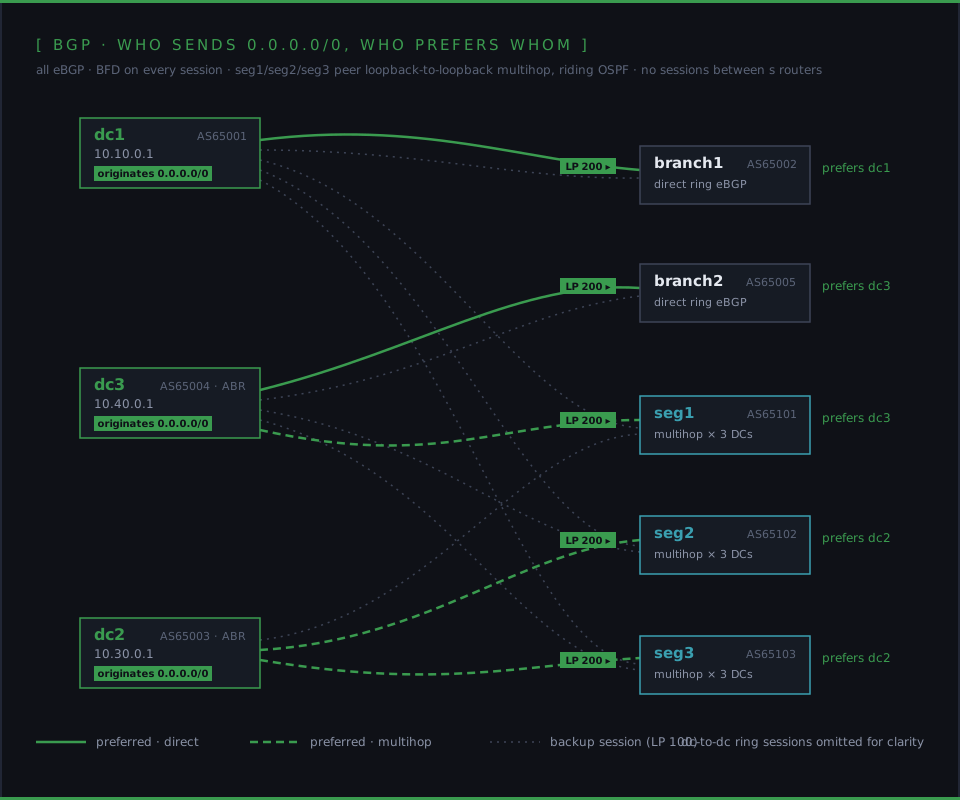
The ring sites are simple. branch1 and branch2 have eBGP sessions with their ring neighbors, receive the default from each, and local preference picks the closer datacenter… branch1 sends traffic out through dc1, branch2 through dc3, and if their preferred exit dies, the LP 100 session to the other neighbor is already holding a spare copy of the same route.
The segment routers work differently. seg1, seg2, and seg3 have no BGP sessions with each other and none with their physical neighbors. Instead, each one runs three eBGP multihop sessions, loopback to loopback, straight to dc1, dc2, and dc3… sessions that ride on top of OSPF reachability across however many hops happen to be in the way. Each segment router then sets local preference 200 toward the DC it should use, and that’s it. seg1 exits through dc3, seg2 and seg3 through dc2.
Stop and look at what that separation buys you. OSPF answers “how do I reach things inside the network.” BGP answers “where does my traffic leave it,” with one prefix and one knob. Moving a site’s egress from one datacenter to another is a one line local preference change on one router… no IGP surgery, no route maps rippling across the ring. When a datacenter loses its internet connection entirely, it stops originating the default, and every site that preferred it slides to its backup source automatically. The failure domain and the policy domain are the same size, which almost never happens in a real network.
BFD runs on everything… every OSPF adjacency, every BGP session, including the multihop ones. When a link in the ring dies, OSPF reconverges underneath the multihop sessions and they never even notice. When a DC dies, BFD tears its sessions down in under a second instead of waiting out EOS’s 180 second BGP hold timer.
Building the file from scratch
Now let’s build the topology file that describes all of that, from an empty file, one decision at a time. Nothing here is hard once you can read it, and by the end you’ll be able to read all of it.
What runs, and what features exist
name: ospf-ring-bgp

provider: clab
defaults.device: eos

plugin: [ bgp.policy, bgp.session, ebgp.multihop ]

module: [ ospf, bgp, bfd ]
Same opening moves as part one… containerlab as the provider, and this time every node defaults to eos. name: matters more now, since containers and lab state get named after it.
Modules are the features netlab knows how to configure… OSPF, BGP, and BFD. Plugins extend what the modules can express, and the three here are the heart of this lab. bgp.policy adds per session attributes like local preference, bgp.session adds session features like BFD on BGP, and ebgp.multihop adds loopback to loopback eBGP sessions. Each is one word here and a pile of generated vendor config later.
Global defaults
bgp.as: 65000
bgp.advertise_loopback: False
bgp.bfd: True

ospf.area: 0
ospf.bfd: True
Anything at the top level is a default for every node. The AS number is a placeholder every node overrides in a moment. BFD lands on every OSPF adjacency and every BGP session. And advertise_loopback: False is quietly load bearing… netlab normally puts each router’s loopback into BGP, and turning that off is what keeps BGP carrying exactly one prefix instead of nine.
The routers
nodes:
  dc1:
    bgp.as: 65001
    loopback.ipv4: 10.10.0.1/16
    bgp.originate: [ 0.0.0.0/0 ]
Here’s dc1, and its three lines are the anatomy of every router in this lab. Its own AS, because this is an eBGP everywhere design… every router is its own autonomous system. A loopback carrying the site’s whole /16, which netlab puts into OSPF as an interface in the node’s area, so each site shows up in every routing table as one /16 with no redistribution anywhere. Finally bgp.originate makes dc1 a source of the default route.
About that hand typed loopback. Part one let netlab pick every address. Here I’m setting the loopbacks by hand because I built this lab to demo this specific design to a client, and giving every site its own /16 makes each site and its routes easy to pick out in the routing table. The links between routers still come from netlab’s pool, as you’ll see further down.
The other seven routers are the same anatomy with three variations… dc2 and dc3 also originate the default, the two branches and three segment routers don’t, and the segment routers carry ospf.area: 1 to put them in the segment area.
  branch1:
    bgp.as: 65002
    loopback.ipv4: 10.20.0.1/16

  seg1:
    bgp.as: 65101
    ospf.area: 1
    loopback.ipv4: 10.101.0.1/16
The ring, and where local preference hides
Now the links, and the notation most likely to stop you on first read. In netlab, every entry in a links: list is a mapping whose keys are node names. Whatever you indent underneath a node’s name applies to that node’s side of the connection. An empty value means “just attach, all defaults.” Here’s the dc1 to branch1 ring link…
links:
  - dc1:
    branch1:
      bgp.locpref: 200
    role: internal
Watch the indentation, because it’s doing all the work. The dash starts one list entry, and both node names belong to it… dc1: and branch1: are two keys of the same link. The bgp.locpref: 200 sits deeper, under branch1, which makes it branch1’s setting on this link. Per the plugin docs, a local preference attached like this is applied by that node to the routes it receives from the neighbor. BGP’s default local preference is 100 and higher wins, so branch1 prefers the default route it hears from dc1 over the same route arriving from dc2. That one indented line is branch1’s entire egress policy.
The third line, role: internal, sits at link level… aligned with the node names, under neither of them. It tells netlab to run OSPF across what it would otherwise treat as a pure inter-AS link. Attribute under a node name applies to that node’s side, attribute at link level applies to the whole link.
The rest of the ring is four more entries in the same shape, with branch2’s preference boost sitting on its dc3 link…
  - branch1:
    dc2:
    role: internal
  - dc2:
    dc3:
    role: internal
  - dc3:
    branch2:
      bgp.locpref: 200
    role: internal
  - branch2:
    dc1:
    role: internal
The segment, with BGP kept out
  - dc3:
    seg1:
    role: internal
    ospf.area: 1
    bgp: False
  - seg1:
    seg2:
    role: internal
    ospf.area: 1
    bgp: False
Two new link level attributes. ospf.area: 1 puts these links in the segment area, and since dc3 and dc2 each have one interface in area 1 and their others in area 0, they become the ABRs without anyone saying the word ABR. And bgp: False keeps BGP off these links entirely… no sessions between physical neighbors down here. That looks strange until you remember the design. The segment routers aren’t supposed to peer with whatever happens to be next to them… which is where the multihop sessions come in.
The multihop sessions
bgp.multihop.sessions:
- seg1:
  dc1:
- seg1:
    bgp.locpref: 200
  dc3:
- seg1:
  dc2:
bgp.multihop.sessions reuses the exact same notation as links… each entry is one session, node names as keys, attributes under a name belonging to that node’s side. These sessions run loopback to loopback, riding OSPF reachability across however many hops are in between. So read seg1’s three entries with the rule from before. A plain session to dc1. A session to dc3 where seg1 applies local preference 200 to what it receives. A plain session to dc2. Three sessions, one boosted… seg1 exits through dc3, with dc1 and dc2 already holding its spare defaults at LP 100. seg2 and seg3 repeat the pattern with the boost moved to their dc2 sessions.
The bgp.locpref: 200 I mentioned back at the top is one of these indented lines. The entire “which datacenter does this site use” policy, for every site in the network, is nine sessions and five of those indented lines.
The whole thing in one file
Assembled, with all eight nodes and all nine multihop sessions written out… eight routers, two OSPF areas, an ABR pair, a /16 loopback per site, and BFD everywhere.
name: ospf-ring-bgp

provider: clab
defaults.device: eos

plugin: [ bgp.policy, bgp.session, ebgp.multihop ]

module: [ ospf, bgp, bfd ]

bgp.as: 65000
bgp.advertise_loopback: False
bgp.bfd: True

ospf.area: 0
ospf.bfd: True

nodes:
  dc1:
    bgp.as: 65001
    loopback.ipv4: 10.10.0.1/16
    bgp.originate: [ 0.0.0.0/0 ]
  branch1:
    bgp.as: 65002
    loopback.ipv4: 10.20.0.1/16
  dc2:
    bgp.as: 65003
    loopback.ipv4: 10.30.0.1/16
    bgp.originate: [ 0.0.0.0/0 ]
  dc3:
    bgp.as: 65004
    loopback.ipv4: 10.40.0.1/16
    bgp.originate: [ 0.0.0.0/0 ]
  branch2:
    bgp.as: 65005
    loopback.ipv4: 10.50.0.1/16

  seg1:
    bgp.as: 65101
    ospf.area: 1
    loopback.ipv4: 10.101.0.1/16
  seg2:
    bgp.as: 65102
    ospf.area: 1
    loopback.ipv4: 10.102.0.1/16
  seg3:
    bgp.as: 65103
    ospf.area: 1
    loopback.ipv4: 10.103.0.1/16

bgp.multihop.sessions:
- seg1:
  dc1:
- seg1:
    bgp.locpref: 200
  dc3:
- seg1:
  dc2:
- seg2:
  dc1:
- seg2:
  dc3:
- seg2:
    bgp.locpref: 200
  dc2:
- seg3:
  dc1:
- seg3:
  dc3:
- seg3:
    bgp.locpref: 200
  dc2:

links:
  - dc1:
    branch1:
      bgp.locpref: 200
    role: internal
  - branch1:
    dc2:
    role: internal
  - dc2:
    dc3:
    role: internal
  - dc3:
    branch2:
      bgp.locpref: 200
    role: internal
  - branch2:
    dc1:
    role: internal

  - dc3:
    seg1:
    role: internal
    ospf.area: 1
    bgp: False
  - seg1:
    seg2:
    role: internal
    ospf.area: 1
    bgp: False
  - seg2:
    seg3:
    role: internal
    ospf.area: 1
    bgp: False
  - seg3:
    dc2:
    role: internal
    ospf.area: 1
    bgp: False
The file is also in the routerjockey-labs repo on GitHub if you’d rather clone than copy. Every steering decision in this network is one of those indented locpref lines, and netlab turns each into the route maps and neighbor statements you’d otherwise be typing eight times over.
The addressing you still didn’t plan
Same trick as part one, bigger canvas… netlab create hands every one of the nine links a /30 from 10.1.0.0/16 and every site keeps its own /16 on the loopback.
$ netlab report addressing
dc1 (10.10.0.1/16)
  Ethernet1                 10.1.0.2/30      dc1 -> branch1
  Ethernet2                10.1.0.18/30      dc1 -> branch2

branch1 (10.20.0.1/16)
  Ethernet1                 10.1.0.1/30      branch1 -> dc1
  Ethernet2                 10.1.0.5/30      branch1 -> dc2

dc2 (10.30.0.1/16)
  Ethernet1                 10.1.0.6/30      dc2 -> branch1
  Ethernet2                 10.1.0.9/30      dc2 -> dc3
  Ethernet3                10.1.0.33/30      dc2 -> seg3

dc3 (10.40.0.1/16)
  Ethernet1                10.1.0.10/30      dc3 -> dc2
  Ethernet2                10.1.0.14/30      dc3 -> branch2
  Ethernet3                10.1.0.21/30      dc3 -> seg1

branch2 (10.50.0.1/16)
  Ethernet1                10.1.0.13/30      branch2 -> dc3
  Ethernet2                10.1.0.17/30      branch2 -> dc1

seg1 (10.101.0.1/16)
  Ethernet1                10.1.0.22/30      seg1 -> dc3
  Ethernet2                10.1.0.25/30      seg1 -> seg2

seg2 (10.102.0.1/16)
  Ethernet1                10.1.0.26/30      seg2 -> seg1
  Ethernet2                10.1.0.29/30      seg2 -> seg3

seg3 (10.103.0.1/16)
  Ethernet1                10.1.0.30/30      seg3 -> seg2
  Ethernet2                10.1.0.34/30      seg3 -> dc2
Proving it works
The claims above are checkable, and this is the section where the lab gets to argue back. Everything below is real output from this exact topology running as eight cEOS containers.
With ~/.netlab.yml already pointing at my 4.36.1F image, the bring up needs no flags at all.
netlab up[CONFIG] dc1: normalize,initial,bfd,routing,ospf,bgp,bgp.session,ebgp.multihop
[CONFIG] branch1: normalize,initial,bfd,routing,ospf,bgp,bgp.session,bgp.policy
[CONFIG] seg1: normalize,initial,bfd,routing,ospf,bgp,bgp.session,bgp.policy,ebgp.multihop
...
12:31:17 INFO Creating container name=seg1
12:31:17 INFO Creating container name=dc1
12:31:17 INFO Creating container name=dc3
12:31:17 INFO Created link: dc1:et1 ▪┄┄▪ branch1:et1
12:31:17 INFO Created link: branch1:et2 ▪┄┄▪ dc2:et1
12:31:17 INFO Created link: dc3:et3 ▪┄┄▪ seg1:et1
...
[SSH] SSH server on node dc2 (device eos) is ready after 6.7 seconds
OK: Lab devices configuredLook at those [CONFIG] lines… each node’s list is exactly the modules and plugins its role needs, derived per router. routing shows up even though the topology never asked for it, because the pieces netlab generates on its own live there, the Null0 static route that anchors each DC’s default and the route maps behind every local preference. Give it a couple of minutes to converge, then interrogate the multihop node.
seg1# show ip bgp summary
BGP summary information for VRF default
Router identifier 10.101.0.1, local AS number 65101
  Description   Neighbor  V AS      MsgRcvd  MsgSent  InQ OutQ  Up/Down State   PfxRcd PfxAcc
  dc1           10.10.0.1 4 65001         7        8    0    0 00:02:31 Estab   1      1
  dc2           10.30.0.1 4 65003         7        8    0    0 00:02:31 Estab   1      1
  dc3           10.40.0.1 4 65004         7        9    0    0 00:02:31 Estab   1      1
Three sessions, three loopbacks, all Established… and each carrying exactly one prefix, because that’s all this BGP has to say. The BGP table is the whole design in four lines.
seg1# show ip bgp
          Network                Next Hop     Metric  AIGP   LocPref Weight  Path
* >      0.0.0.0/0              10.40.0.1    0       -      200     0       65004 ?
*        0.0.0.0/0              10.30.0.1    0       -      100     0       65003 ?
*        0.0.0.0/0              10.10.0.1    0       -      100     0       65001 ?
One route, three sources, and the LP 200 from that single indented line in the topology file sitting on top. The routing table resolves it recursively through OSPF, out seg1’s direct link toward its preferred DC.
seg1# show ip route 0.0.0.0/0
Gateway of last resort:
B E      0.0.0.0/0 [200/0]
           via 10.1.0.21, Ethernet1
The direct ring case looks the same with shorter plumbing. branch1 holds two copies of the default from its two ring neighbors, prefers dc1, and points straight out its dc1 link.
branch1# show ip bgp
          Network                Next Hop     Metric  AIGP   LocPref Weight  Path
* >      0.0.0.0/0              10.1.0.2     0       -      200     0       65001 ?
*        0.0.0.0/0              10.1.0.6     0       -      100     0       65003 ?

branch1# show ip route 0.0.0.0/0
Gateway of last resort:
B E      0.0.0.0/0 [200/0]
           via 10.1.0.2, Ethernet1
OSPF’s side of the job shows up in branch1’s OSPF routes, trimmed here to the site loopbacks. Every site is one /16, the ring sites as plain intra-area routes and the segment routers as inter-area routes through the ABRs, and nothing is external.
branch1# show ip route ospf
O        10.10.0.0/16 [110/20]
           via 10.1.0.2, Ethernet1
O        10.30.0.0/16 [110/20]
           via 10.1.0.6, Ethernet2
O        10.40.0.0/16 [110/30]
           via 10.1.0.6, Ethernet2
O        10.50.0.0/16 [110/30]
           via 10.1.0.2, Ethernet1
O IA     10.101.0.0/16 [110/40]
           via 10.1.0.6, Ethernet2
O IA     10.102.0.0/16 [110/40]
           via 10.1.0.6, Ethernet2
O IA     10.103.0.0/16 [110/30]
           via 10.1.0.6, Ethernet2
Now break it
The failure drill, and we’ll stay inside the toolchain for it. netlab config pushes a config template to any set of nodes, so a two line snippet becomes a node failure delivered in band… all three of dc3’s links shut at once, like a power event that leaves the config intact.
$ cat dc3-down.j2
interface Ethernet1-3
   shutdown

$ netlab config dc3-down -l dc3
seg1 gave up on dc3 in under a second. By the time I got a prompt open on seg1, its session to dc3 was already down and dialing.
bfd.min_tx, bfd.min_rx and bfd.multiplier in the topology file.seg1# show ip bgp summary
Description Neighbor V AS MsgRcvd MsgSent InQ OutQ Up/Down State PfxRcd PfxAcc
dc1 10.10.0.1 4 65001 8 86 0 0 00:03:21 Estab 1 1
dc2 10.30.0.1 4 65003 8 85 0 0 00:03:21 Estab 1 1
dc3 10.40.0.1 4 65004 8 87 0 0 00:00:31 ConnectAnd here’s a detail the diagram makes obvious in hindsight… seg1’s physical uplink to the backbone was dc3. Losing that DC cost seg1 its preferred exit and its own front door to the backbone, so everything now rides the segment chain out through seg2 and seg3. The surviving LP 100 paths tie all the way down to IGP cost to the next hop, and dc2 sits three hops down the chain while dc1 is all the way around the ring, so dc2 wins.
seg1# show ip bgp
          Network                Next Hop     Metric  AIGP   LocPref Weight  Path
* >      0.0.0.0/0              10.30.0.1    0       -      100     0       65003 ?
*        0.0.0.0/0              10.10.0.1    0       -      100     0       65001 ?

seg1# show ip route 0.0.0.0/0
Gateway of last resort:
B E      0.0.0.0/0 [200/0]
           via 10.1.0.26, Ethernet2
branch2 preferred dc3 too, over its direct ring session. Same story, different mechanism… its LP 200 session died with dc3’s links, and the LP 100 spare from dc1 was already holding the route.
branch2# show ip route 0.0.0.0/0
Gateway of last resort:
B E      0.0.0.0/0 [200/0]
           via 10.1.0.18, Ethernet2
Restoration is the same two lines with no shutdown, pushed the same way. BGP’s connect retry takes a few minutes to walk the multihop session back up, and then the default goes home without anyone touching seg1.
$ netlab config dc3-up -l dc3

seg1# show ip bgp summary
  Description   Neighbor  V AS      MsgRcvd  MsgSent  InQ OutQ  Up/Down State   PfxRcd PfxAcc
  dc1           10.10.0.1 4 65001        15       93    0    0 00:08:35 Estab   1      1
  dc2           10.30.0.1 4 65003        14       91    0    0 00:08:35 Estab   1      1
  dc3           10.40.0.1 4 65004        18       98    0    0 00:04:49 Estab   1      1

seg1# show ip route 0.0.0.0/0
Gateway of last resort:
B E      0.0.0.0/0 [200/0]
           via 10.1.0.21, Ethernet1
In most networks, “change which datacenter this site egresses from” is a change ticket with a blast radius. Here it’s one local preference value, and the proof is a routing table that reorganized itself twice while we watched.
What this design is teaching
Underneath the netlab tooling, this topology is a compact lesson in separating concerns. The IGP moves packets between loopbacks and never learns what the internet is. BGP holds policy, and because it holds only policy, its entire configuration surface is three originate statements and a handful of local preferences. Compare that against stuffing the default into OSPF as an external route from three ABRs and then trying to steer per site egress with type 2 metrics… the same reachability, with the policy smeared into the topology where nobody can see or change it safely.
It’s the same principle as keeping a design down to its load bearing parts, applied to protocol roles instead of boxes. And it’s a lab you can now stand up in a few minutes, break in every way this post claims it survives, and check the claims yourself… which is the entire reason the lab exists as about a hundred lines of YAML instead of a diagram in a design doc nobody can execute.
Disclosure. Ivan Pepelnjak, netlab’s author, is a friend. He didn’t ask for this series and didn’t review it before publication. The opinions here are mine. For more, please read my full disclaimer.
Get the rest of Labs as Code in your inbox.



Comments