Tailworm: What to Lock Down in Tailscale Before the Patch Lands
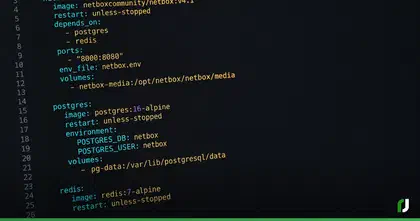
The demo that opens Tailworm starts with an ordinary user account on a Linux server, no sudo, not in the docker group. It runs one command, ssh -L /tmp/relay.sock:/tmp/docker.sock user@target, then points the Docker CLI at the relay socket and starts a container with the host’s root filesystem mounted. The output is uid=0(root) and the first few lines of /etc/shadow. Tailworm is a report Erica Windisch of Cyberdione Labs published on October 25 against Tailscale 1.104.2 and headscale 0.29.5. Tailscale hasn’t shipped a patch, a CVE or a bulletin for it yet.
I’ve recommended Tailscale on this blog, it’s the remote access piece of the home lab stack in my Docker series, and I still run it. These days the control server behind my tailnet is my own headscale instance rather than Tailscale’s hosted one, so the headscale findings land on my network too. Consider this my list of what I’d change on a tailnet this week, while Tailscale works on fixes. When Tailscale responds to the report with a bulletin or a patch, I’ll update this post with what changed.
What the report found
Of the 11 findings in Tailworm, most of the attention has gone to the bugs in Tailscale SSH, the ones that can get you rooted. Tailscale SSH is an SSH server built into tailscaled, the agent that runs as root on every Linux node. When a session forwards a Unix socket (ssh -L or ssh -R), that root process does the work… it dials the socket, or deletes whatever sits at the path and binds a new listener there. Tailscale limits forwarding to a short list of paths (home directories, /tmp and /run/user), but the check looks at the path once and the kernel resolves it again a moment later. A script renaming directories fast enough wins that race.
In the lab, that got the report to root through Docker, a root shell through systemd’s private socket, and arbitrary root file deletion. Worse, by hijacking tailscaled’s own control socket, the report captured an auth key the next time an admin ran tailscale up with one, then used it to join an attacker’s machine to the tailnet as a tagged server. The report ran that end to end on a tailnet without Tailnet Lock. With Tailnet Lock on, it captured the secrets in transit but didn’t finish the job.
Windisch calls the result “wormable,” meaning one compromised device can hop to every device the SSH policy lets it reach, with no passwords or stolen keys, in under a second per hop. That timing came from a lab, and The Hacker News reports that some researchers who read it have publicly questioned the label.
The rest of the findings matter to fewer of you. The experimental conn25 app connector lets an entitled user send traffic to any destination the connector can reach, cloud metadata services included, without the tailnet’s ACLs ever seeing the real destination. A tailscale serve TCP forward pointed at tailscaled’s own socket hands remote peers the node’s admin API. And on a self-hosted headscale, anyone who can reach it can block new devices from joining.
Why it works
Tailscale SSH trusts the device identity WireGuard has already established, so the SSH handshake completes without user authentication, and one policy rule decides whether that device may open a session. Malware running as any user on a permitted device carries the device’s full SSH rights. Restricting SSH to non-root accounts doesn’t help, since every one of these attacks runs from an unprivileged session.
If you’ve ever worried about a jumpbox full of SSH keys, this is the same problem with the jumpbox spread across the whole tailnet. A compromised jumpbox hands an attacker every host its keys open. With broad Tailscale SSH rules, every laptop and server the policy covers is that jumpbox, and there’s no key file to steal or rotate, because the device itself is the credential. Tailworm makes it worse than the jumpbox case. A stolen key logs you in as whoever owns it, and these forwarding bugs turn any session into root on the far end.
The other half is privilege. OpenSSH forks a child for each session and drops it to the logged in user before forwarding anything, so a forwarded socket gets opened with the user’s permissions and the kernel says no. Dropbear shipped this exact bug class last year as CVE-2025-14282, where a forwarded Unix socket connected as root and handed out root on most systems. Its fix in 2025.89 was to drop privileges right after authentication. OpenSSH went further this month with a commit that disables socket forwarding outright on the odd platforms where its post-login process has to stay root, because those features “assume user privilege.” Tailscale SSH does the same forwarding from a process that never stops being root.
Tailscale has been here before… several times this year. Its security bulletins include TS-2026-004 (SSH socket forwarding ignored symlinks), TS-2026-005 (serve socket targets weren’t restricted to root), TS-2026-006 (logging in as UID 0 bypassed root restrictions) and TS-2026-009 (a username starting with a dash got a root session). All of those were fixed in 1.98.9, and Tailworm went after the same corners on 1.104.2. Tailscale’s most recent bulletin, TS-2026-013, was its fix for last week’s eMudhra mess.
What’s still unconfirmed
All of this rests on one researcher’s report. Nobody has publicly reproduced it, and the proof of concept went only to Tailscale. The disclosure itself is a fight. Windisch called it “reported but not coordinated” on Hacker News, and told The Hacker News she sent the report and code to Tailscale’s security contact the Saturday before publishing. At least one Hacker News commenter called that irresponsible. The report is a slog, dense with internal audit labels, though the SSH findings come with commands and reproduction steps, which is more than a lot of vendor advisories give you.
Tailscale’s response so far is… a Reddit post from Mike Shaver, its VP of engineering. He says the company got the report, had already been looking at the same areas with outside security specialists, has found issues it’s working to fix, and is “not recommending that everyone disable Tailscale SSH.”
What to change this week
None of these need a patch, so there’s no reason to wait on Tailscale. I’ve ordered them by how much I think each one buys you.
- Rewrite your SSH rules as pairs. Each rule names one source and one destination. Drop any rule that grants access by group or tag. The report found this was the single control that stopped the spread in the lab. If a laptop gets popped, the attacker reaches the two servers its owner manages and stops there. The rules live in the
sshsection of your policy file (Access controls in the admin console), and Tailscale’s policy file reference covers every field a rule takes. On headscale the samesshblock goes in the policy file you point the server at. - Treat every SSH grant as root on the target. On headscale 0.29.5 that’s true as written, since its policy code hardcodes local and remote forwarding on for every accepted session. For the hosted service, the report says to set the per rule forwarding flags to false. Tailscale’s protocol does carry those flags, but the policy file reference doesn’t list a field for them, so ask Tailscale support how to set them, and assume forwarding is on until you’ve confirmed it’s off.
- Turn on Tailnet Lock. Without it, the report’s rogue node joined cleanly. With Lock on, the attacker also has to use the captured disable secret, a step the report didn’t take. Enable it from the Device management page in the admin console, which hands you a
tailscale lock initcommand to run on one of your signing nodes. Store the disablement secrets it prints somewhere safe, since they only show once. If a signing node is ever compromised, revoke its key withtailscale lock revoke-keysfrom a node you still trust. The Tailnet Lock docs walk through both. - Give server keys an expiry. Tagged devices have key expiry disabled by default. Turn it back on for your servers, so a key copied off a box stops working on its own. On the Machines page, open the menu at the end of the device’s row and pick Enable key expiry. The key expiry docs have the details.
- Use check mode with a custom period. Check mode leaves the forwarding bugs open, since forwarding happens inside a session that already passed the check. With the default period, one approval covers every device in the tailnet for 12 hours. Setting
checkPeriodexplicitly scopes the approval to that one device, and for privileged rules the report suggests minutes oralways. Change the rule’sactionfromaccepttocheckand add thecheckPeriodfield. Custom periods need the Premium or Enterprise plan. - Audit
tailscale serve. Runtailscale serve statuson each node to see what it’s forwarding, and remove any--tcpforward that points at a Unix socket, especially/run/tailscale/tailscaled.sock.tailscale serve --tcp=<port> offdrops one forward, andtailscale serve resetclears them all. Both are in the serve CLI reference. - Pull app connector access from anyone who doesn’t need it. Access to a connector comes from your policy file, through whoever can reach the connector’s tag (see the app connector docs). If you run connectors, put a destination allowlist on the connector host’s firewall, and in Kubernetes a default deny egress NetworkPolicy on the connector namespace.
- Delete compromised nodes in the admin console. A node’s identity lives in a state file root can copy. Reimaging wipes the server’s copy and leaves the attacker’s working. Deleting the device revokes the key everywhere. On the Machines page, open the device’s menu and pick Remove (steps here). On headscale, find the node’s ID with
headscale nodes listand runheadscale nodes delete --identifier <id>.
If you can’t get through that list, Windisch’s advice is to turn off Tailscale SSH. Run tailscale set --ssh=false on each node, after you’ve confirmed regular OpenSSH works over the tailnet, so you don’t lock yourself out. OpenSSH covers the gap until fixes ship, and a lot of us ran exactly that setup before Tailscale SSH existed.
The scary chain in Tailworm also needs a foothold first, and the report is clear on how those happen… a vulnerable web app, a phishing implant, or a poisoned package or GitHub Action in a CI pipeline. Once someone has that foothold, your SSH rules decide how far they get, and you can tighten those today without waiting on Tailscale. Keep an eye on the bulletins page and turn on auto updates so the fix lands the day it ships. On Linux that’s tailscale set --auto-update, and for new devices it’s the Auto-update new devices toggle under Device management (see the update docs).
New posts in your inbox when they publish. No digest, no marketing.